Works with any AI client
Setup takes about ten minutes. See the guide for each →
{
  "mcpServers": {
    "innersheet": {
      "command": "/path/to/innersheet/.venv/bin/python",
      "args": ["/path/to/innersheet/server.py"],
      "env": {
        "GOOGLE_OAUTH_CLIENT_SECRETS": "/path/to/client_secret.json"
      }
    }
  }
}
Also Claude Code, Cline, Zed, JetBrains — and any client that speaks MCP.
Your data lives in Sheets. Your AI can't reach it.
Most integrations mirror the API one call at a time — a real job takes ten or more calls, and each one can hit the wrong row.
| The old way | With InnerSheet | |
|---|---|---|
| Getting data to the AI | Export CSVs by hand, paste tables into chat | Direct tools — the agent reads the sheet itself |
| Syncing a daily report | 10+ separate calls, orchestrated by hand | 1 workflow call finishes the whole sync |
| Formatting | Destroyed silently by values-only writes | Preserved — reads return values, formulas and format |
| Cost | Per-call billing on managed platforms | $0 — free, self-hosted, no middleman |
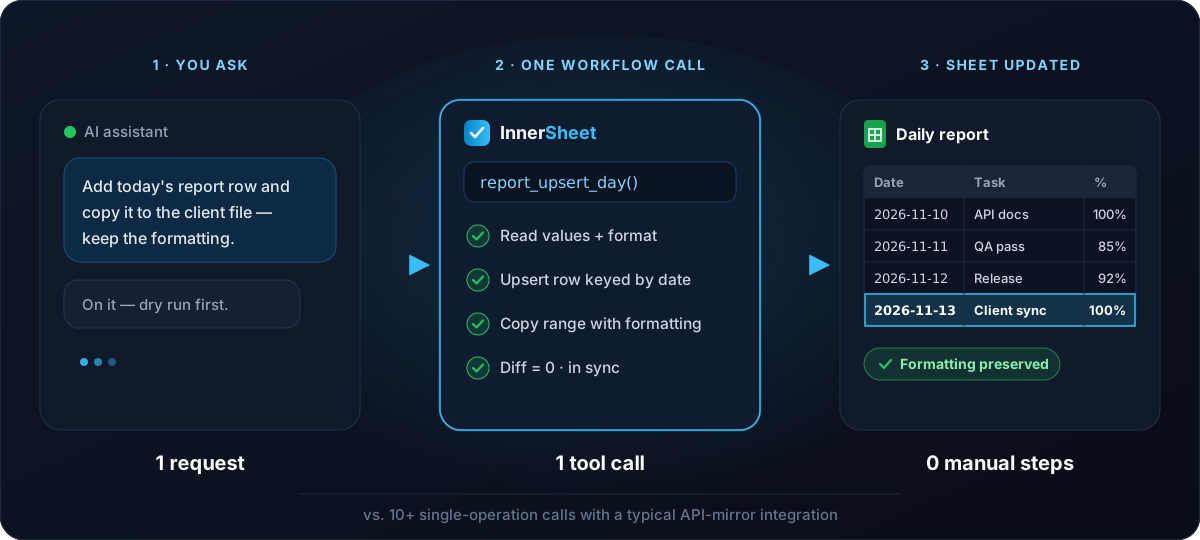
One small server. Every job in one call.
A free, open-source Python MCP server that runs on your machine and talks straight to Google.
Runs locally
Your own Google account — no vendor in the middle.
24 tools
Read, write, format, chart and sync reports.
Web chats too
ChatGPT and Claude.ai once deployed over HTTPS.
$0 to run
MIT licence. No account, no per-call billing.
Built for the jobs, not the API
Tools that finish real work — with guardrails in the code, not just the prompt.
Workflow tools, not API mirrors
report_upsert_day finishes a whole sync in one call — no half-done syncs, no files out of step.
Reads that keep formatting
get_values_rich returns values, formulas and format in one read, so writes never wreck a styled sheet.
Guardrails in code
dry_run, write echoes, a READ_ONLY switch, an allowlist and confirmed deletes.
Verbatim reports
Dates, percentages and task names copied exactly as typed — never rewritten or rounded.
Your account, your data
OAuth or a service account. No third-party platform, no telemetry, no per-call billing.
Raw escape hatch
sheets_batch_update passes any Sheets API request verbatim — banding, protection, slicers.
Daily reports that sync themselves
A daily row is keyed by date, copied exactly as typed, and must match the client's copy — formatting included.
- 1
Upsert by date
report_upsert_dayoverwrites the row if the date exists, appends it if not. - 2
Copy with formatting
report_copy_rangecopies values or formulas plus format between files — deleting nothing. - 3
Diff to verify
report_compare_rangeschecks cell by cell. A diff of 0 means in sync.
Plus 3 MCP prompts and a Claude Code plugin with hooks — see the tools →

Powerful, and always in your control
Guardrails live in the server code, so they hold even when the prompt doesn't.
- ✓
Dry run
Preview the exact plan before anything is written.
- ✓
Read-only mode & allowlist
One
READ_ONLYswitch, and only the spreadsheets you name. - ✓
Confirmed deletes & API key
Destructive calls need confirmation; the remote endpoint needs a key.
InnerSheet vs a managed platform
Ten minutes of setup in exchange for control, workflow tools and zero running cost.
| InnerSheet | Managed platform | |
|---|---|---|
| Workflow tools (one call = one job) | Yes | Usually one tool per API operation |
| Rich reads (values + formulas + format) | Yes, one call | Values-first; format needs extra calls |
| Custom rules (verbatim copy, dedup by date) | Built in | Not built in |
| Cost | Free, self-hosted | Per-use billing |
| Data path | Direct to Google | Via vendor infrastructure |
| Setup time | ~10 minutes, one OAuth client | Fastest (managed auth) |
| Vendor cloud required | No | Yes — vendor cloud required |
Pick a managed platform if you…
- Want the quickest possible connection
- Don't mind per-use billing
Pick InnerSheet if you…
- Run reports every day
- Care about exact values, copied verbatim
- Don't want a vendor in the middle of your company data
Honest limits
Mostly Google's and the protocol's — every MCP server faces them.
| Limit | What it means | Workaround |
|---|---|---|
| Pivot tables | The API can create them, but there is no dedicated pivot tool yet. | Send the raw request through sheets_batch_update. |
| Google quota | 300 reads and 300 writes per minute per project — 60 of each per user. Over the limit returns HTTP 429. | Batch very large jobs. |
| Web chats | ChatGPT and Claude.ai only accept remote MCP servers over HTTPS. | Deploy v2's API-key-protected HTTP mode. |
| Apps Script | Not exposed by the Sheets API at all. | Macros stay in the Sheets UI. |
Up and running in 10 minutes
macOS, Windows and Linux — step by step, with troubleshooting for the errors people actually hit.
Install uv
One command in your terminal.
Run the installer
Sets up Python and configures Claude Desktop.
Add a Google OAuth client
Free, one-time, about five minutes.
Ask your assistant
Start with “list my spreadsheets”.
Quick answers
More on the FAQ page →
Does it work with ChatGPT?
Not with a local install — ChatGPT on the web only connects to remote MCP servers over HTTPS. Deploy InnerSheet in HTTP mode and add it as a custom connector.
What does it cost?
Nothing. InnerSheet is free under the MIT licence, and the Google Sheets API is free within quota.
Is my data safe?
The server runs on your machine and talks directly to Google with your credentials. Read the security page for the full threat model and mitigations.
Can it build pivot tables?
Yes, through the raw escape hatch: sheets_batch_update passes a batchUpdate + updateCells request verbatim. There is no dedicated pivot tool yet.
Do I need to know Python?
No. The installer creates the environment and installs the dependencies for you.
Can the AI delete my data by mistake?
Deletes refuse to run without explicit confirmation, every write can be previewed with a dry run, and a read-only switch turns off writes entirely.